What's New更新情報
New features and improvements on Nihongo no Jikan.にほんごのじかんの新機能・改善のお知らせです。
- New feature新機能
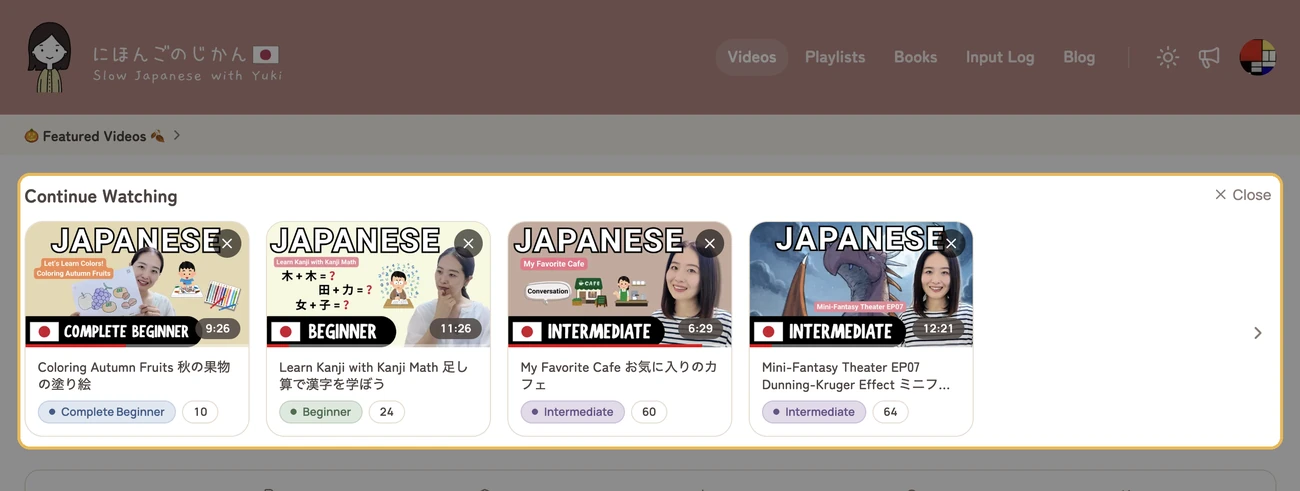
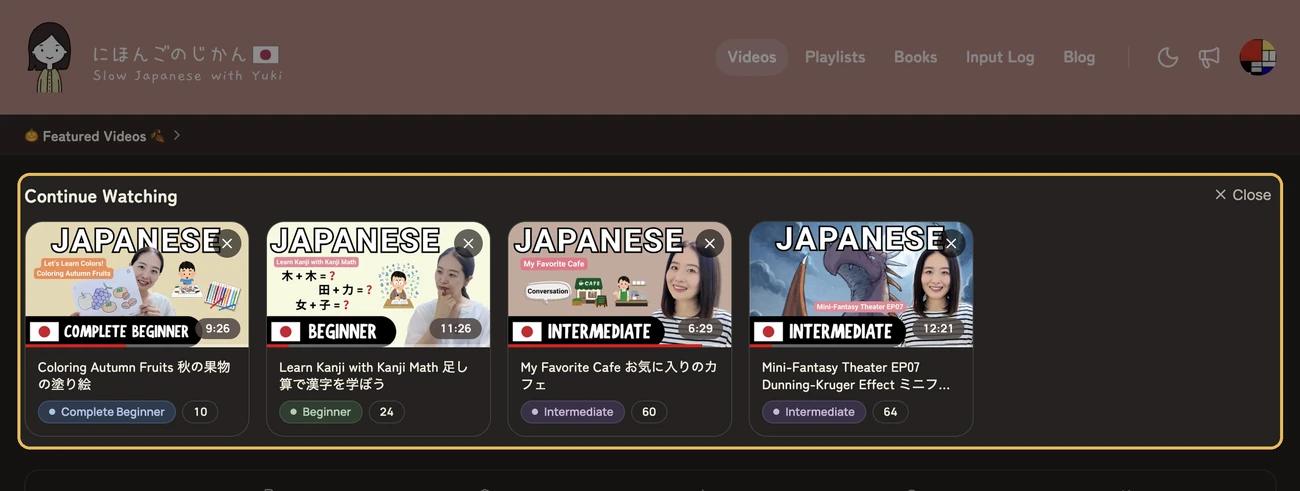
Continue Watching on the Videos page動画一覧に「視聴中」の列
The top of the Videos page now shows videos you stopped partway through, with the most recently watched first. Open one to pick up where you left off. To remove a video from the list, choose × on its card.
Videos you stopped within the first minute and videos marked as watched are not shown.
動画一覧の上に、途中まで見た動画を最後に見た順で並べるようにしました。開くと続きから再生できます。カードの × を押すと、その動画を列から外せます。
最初の 1 分以内でやめた動画と、視聴済みにした動画は並びません。
- New feature新機能
Recommended videos on the Videos page動画一覧におすすめ動画
The top of the Videos page now shows a selection of recommended videos. The selection changes from time to time.
If you would rather not see it, choose × to fold it into a thin bar. Choose the bar to show it again.
動画一覧の上に、おすすめ動画をいくつか並べるようにしました。並ぶ動画はときどき入れ替えます。
表示が不要なときは × で細い帯にたたむことができます。帯を押すと元に戻ります。
- New feature新機能
Saving search results as a playlist検索結果をプレイリストに保存
You can now save the videos that match your current filters on the Videos page as a playlist.
Choose Save as Playlist below the filters, and all matching videos will be added in the same order as they appear in the list. On a phone, you'll find it in the ⋯ menu at the top of the list.
The playlist name is filled in based on your filters, and you can change it before saving.
動画一覧の検索条件に合う動画を、プレイリストとして保存できるようにしました。
検索条件の下にある「プレイリストに保存」を押すと、条件に合う動画がすべて、一覧と同じ並び順で入ります。スマホでは一覧の上にある ⋯ メニューの中にあります。名前は検索条件から自動で入り、保存する前に変更できます。
- New feature新機能
Downloading blog posts as EPUB記事を EPUB でダウンロード
You can now download a blog post as an EPUB file and read it in your favorite reading app.
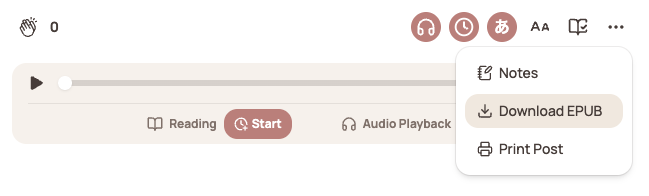
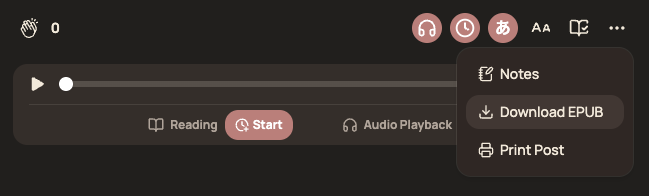
Open a post and choose Download EPUB from the ⋯ menu above the text. As with video transcripts, you can choose either the version with furigana or the version without.
ブログの記事を EPUB でダウンロードして、お好きな読書アプリで読めるようにしました。
記事を開き、本文の上にある ⋯ メニューから「EPUB をダウンロード」を選んでください。動画のスクリプトと同じように、ふりがなのあるものと、ふりがなのないもののどちらかを選べます。
- New feature新機能
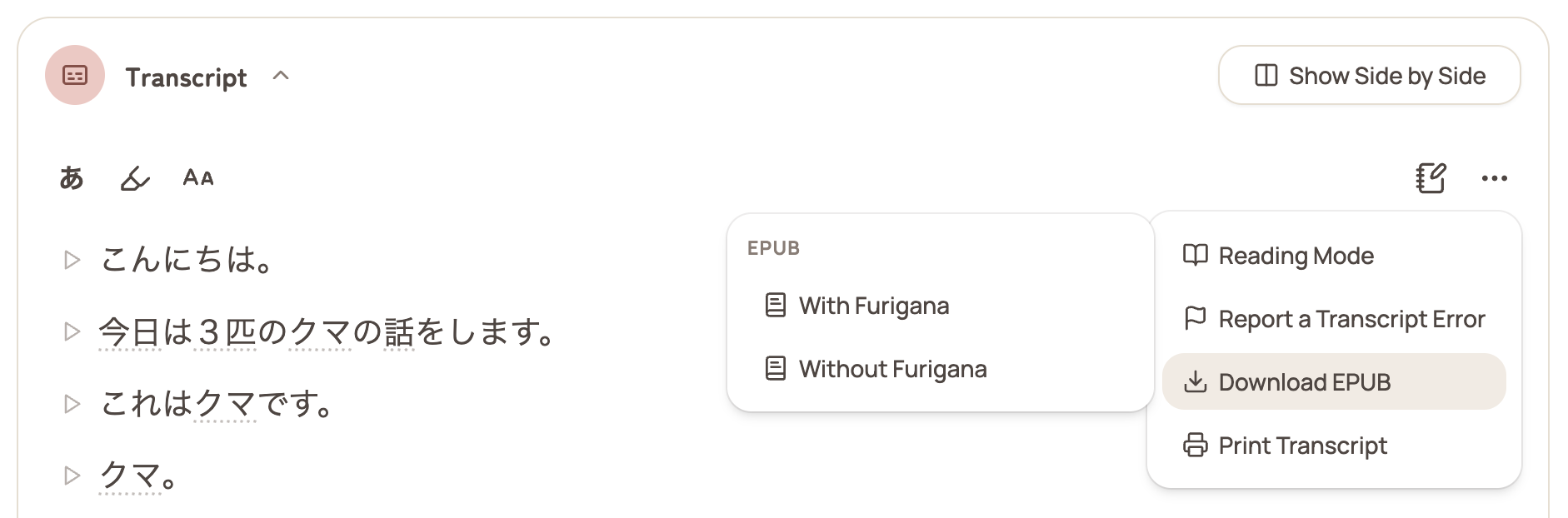
Downloading transcripts as EPUBスクリプトを EPUB でダウンロード
You can now download a video's transcript as an EPUB file and read it in your favorite reading app.
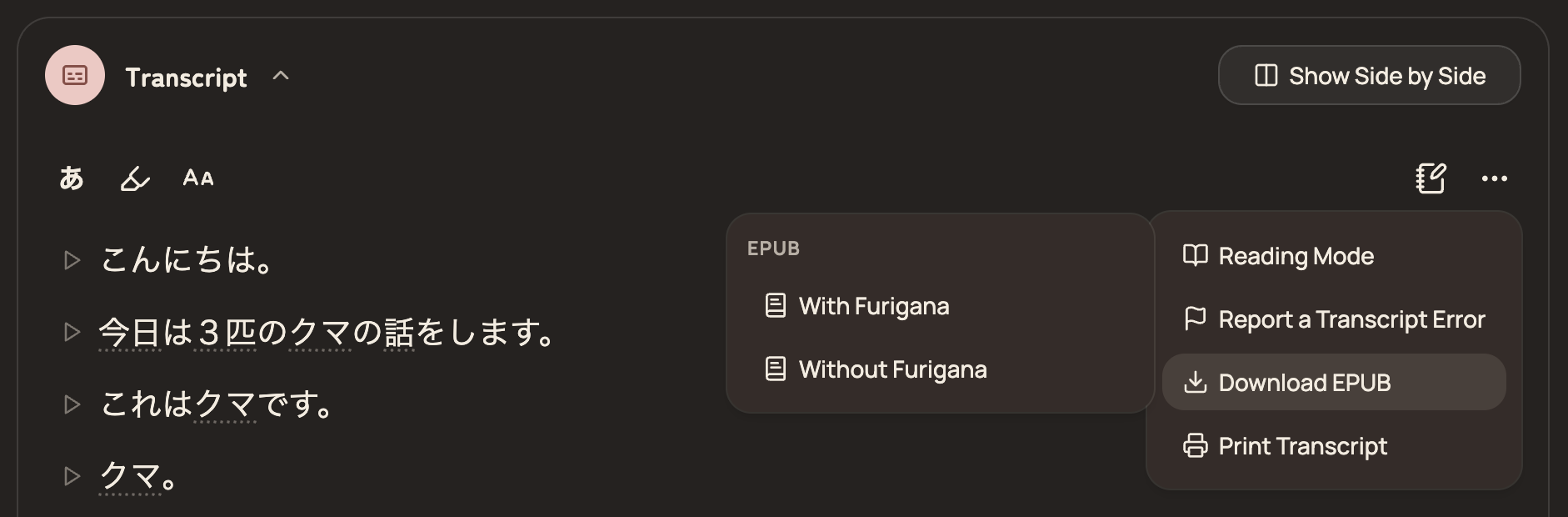
Open the transcript on a video page and choose Download EPUB from the ⋯ menu. You can choose either the version with furigana or the version without.
The EPUB file works with reading apps such as Apple Books, and you can also send it to a Kindle.
動画のスクリプトを EPUB でダウンロードして、お好きな読書アプリで読めるようにしました。
動画ページでスクリプトを開き、⋯ メニューから「EPUB をダウンロード」を選んでください。ふりがなのあるものと、ふりがなのないもののどちらかを選べます。
EPUB は Apple Books などの読書アプリで読めるほか、Kindle に送って読むこともできます。
- Improvement改善
Total length on the Videos page動画一覧に合計時間を表示
The Videos page now shows the total length of the listed videos next to the number of videos. The total changes with your filters, so you can see how long the selected videos are altogether.
動画の一覧で、動画の件数の右に、一覧にある動画の合計時間を表示するようにしました。絞り込みの条件を変えると合計時間も変わるので、選んだ動画が全部でどのくらいの長さになるかがわかります。
- New feature新機能
Reading Modeリーディングモード
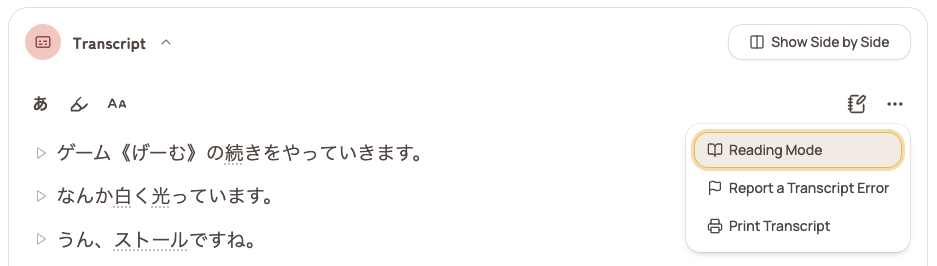
Reading Mode lets you read a video's transcript without the video.
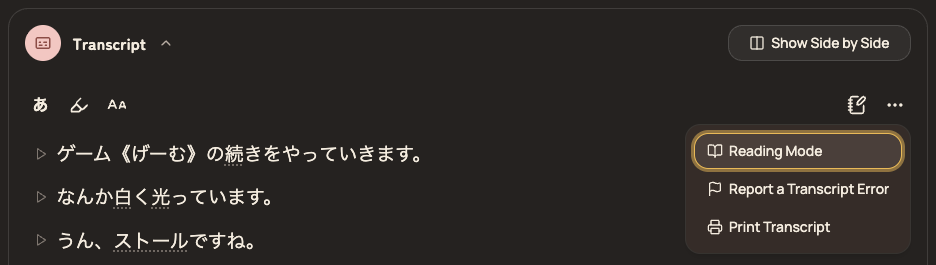
Open the transcript on a video page and choose Reading Mode from the ⋯ menu. The video is hidden, leaving only the transcript on the screen. The audio keeps playing, so you can listen while you read.
Reading Mode also includes a reading timer and a form to save your reading time to your Input Log. The timer doesn't start automatically, so press Start when you begin reading.
To go back, use the exit button at the top of the transcript or at the bottom of the page.
動画のスクリプトだけを読む「リーディングモード」を追加しました。
動画ページでスクリプトを開き、⋯ メニューから「リーディングモード」を選ぶと、動画を閉じてスクリプトだけの画面になります。音声はそのまま聞けるので、聞きながら読むこともできます。
読んでいる時間を計るタイマーと、その時間をインプットログに記録するフォームもあります。タイマーは自動では始まらないので、読み始めるときに「開始」を押してください。
元の画面に戻るときは、スクリプトの上か、ページの下にある終了ボタンを押してください。
- Improvement改善
Printing blog postsブログ記事の印刷
You can now print blog posts.
Open the ⋯ menu at the top of a blog post and choose Print Post. Before printing, you can choose whether to include the images in the post.
ブログ記事を印刷できるようになりました。
記事の上にある ⋯ メニューから「記事を印刷」を選んでください。印刷する前に、記事の画像を含めるかどうかを選べます。
- Fix修正
Fixed unwanted horizontal scrolling横にスクロールできてしまう問題を修正しました
Fixed an issue where video pages and blog post pages could be scrolled sideways into an empty area.
動画ページとブログ記事のページで、何もない領域まで横にスクロールできてしまう問題を修正しました。
- New feature新機能
Quick Playlistおまかせプレイリスト
You can now create a Quick Playlist from the Videos page.
Choose how long you want to watch, and Quick Playlist will create a playlist of random videos that match your current filters.
If you've set a Daily Goal, the remaining time for today is filled in automatically. You can choose one of the preset lengths or enter any length you like.
A Quick Playlist works differently from a regular playlist. Each video is removed from the playlist after you finish watching it, and the playlist is automatically deleted once you've watched every video.
You can also edit or delete a Quick Playlist from the Playlists page.
動画一覧から、おまかせプレイリストを作成できるようになりました。そのときの検索条件に合う動画からランダムに選んで、見たい時間を指定しプレイリストを作ることができます。
1 日の目標を設定している場合は、今日の残り時間があらかじめ入ります。決まった長さから選ぶことも、任意の長さを自分で入力することもできます。
おまかせプレイリストは通常のプレイリストとは違い、見終わった動画はリストから削除され、すべて見終わるとプレイリスト自体も削除されます。プレイリストのページからも編集・削除できます。
- New feature新機能
Autoplay for the next video次の動画の自動再生
When a video ends, the next recommended video now appears above the player and starts automatically after an 8-second countdown. This does not apply when you're watching a playlist — playlists continue in their own order.
The countdown pauses if the player is off screen or the tab is in the background, so the next video won't start without you.
You can also select Play now to start the next video immediately, or Cancel to stay on the current video.
You can turn autoplay off using the switch on the autoplay screen or from the ⋯ menu below the video. Your preference is remembered on this device.
動画が終わると、次におすすめの動画がプレイヤーの上に表示され、8 秒のカウントダウンのあと自動で再生が始まります。プレイリストを再生しているときは動きません。プレイリストはこれまでどおり保存した並び順で進みます。
プレイヤーが画面から外れているときや、タブが後ろに回っているときはカウントダウンが止まります。見ていない間に次の動画が始まることはありません。
「今すぐ再生」を選ぶとすぐに次の動画へ移り、「キャンセル」を選ぶといまの動画に留まります。
自動再生は、その画面のスイッチか、動画の下の ⋯ メニューからオフにできます。設定はこの端末に記憶されます。
- New feature新機能
Loop and shuffle for playlistsプレイリストのループ再生とシャッフル
Playlists can now be looped and shuffled.
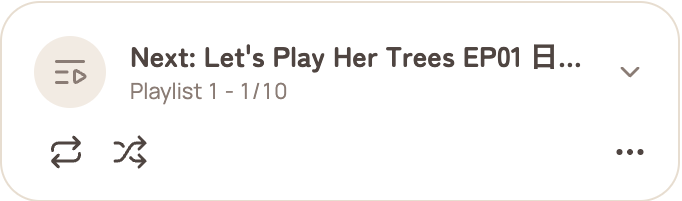
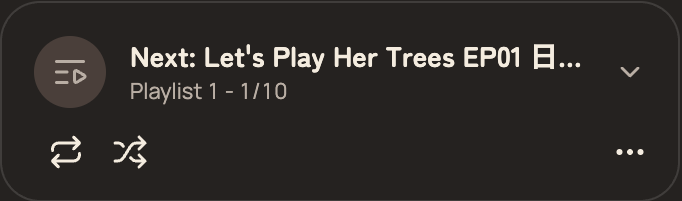
The loop button is at the top of the playlist panel on the video page. Each press switches between looping the entire playlist, looping the current video, and turning looping off.
Next to it is a shuffle button. When shuffle is on, the next video is randomly selected from the videos you haven't played yet. The order of videos saved in the playlist does not change.
Both settings apply only to the playlist currently playing. They are turned off when you reload the page or start a playlist again.
プレイリストをループ再生・シャッフル再生できるようになりました。
ループボタンは、動画ページのプレイリストパネルの上部にあります。押すたびに、プレイリスト全体をループ / いま見ている動画をループ / ループをオフ、と切り替わります。
その隣がシャッフルボタンです。シャッフルをオンにすると、次の動画は、まだ再生していない動画からランダムに選ばれます。プレイリストに保存された動画の並び順は変わりません。
どちらの設定も、いま再生しているプレイリストにだけ適用されます。ページを再読み込みしたときや、プレイリストを再生し直したときにはオフに戻ります。
- Fix修正
Fixed incorrect audio downloads音声ダウンロードのファイルが誤っていた問題を修正しました
The audio downloads for What's In the Bag? バッグの中身は何でしょう? were mistakenly linked to a different video's audio. Both MP3 and MP3 (Silence Removed) have now been replaced with the correct audio.
If you downloaded either file before, please download it again.
What's In the Bag? バッグの中身は何でしょう? の音声をダウンロードすると、別の動画の音声が入っていました。MP3 と MP3 (Silence Removed) のどちらも、正しい音声に差し替えました。
すでにダウンロードされていた場合は、あらためてダウンロードしてください。
- New feature新機能
Search videos by transcriptスクリプトの内容で動画を検索できるようになりました
You can now search videos by what's said in their transcripts on the Videos page.
Click the search box and select Transcript to include video transcripts in your search. You can search in either kanji or kana—for example, searching for しごと will also find 仕事.
I hope this helps you find videos that use the words and phrases you want to learn.
動画の一覧で、動画のスクリプトで話されている内容から動画を検索できるようになりました。
検索欄を選んで「スクリプト」にチェックを入れると、スクリプトも検索対象になります。漢字でもかなでも検索でき、たとえば「しごと」で検索すると「仕事」も見つかります。
学びたい言葉やフレーズが使われている動画を探す助けになればと思います。
- Fix修正
Fixed blank pages when printing transcriptsスクリプトの印刷で空白のページが入る問題を修正しました
Fixed an issue where printing a transcript from a video page could include blank pages in some browsers, such as Firefox.
動画ページのスクリプトを印刷したとき、一部のブラウザ(Firefox など)で空白のページが挟まることがある問題を修正しました。
- New feature新機能
Added a Guide pageガイドのページを追加しました
A new Guide page is now available, featuring an introduction to Nihongo no Jikan and an About Me section.
You can access it from the footer at the bottom of every page.
にほんごのじかんの紹介と、わたしについての内容をまとめたガイドのページを追加しました。
各ページの下にあるフッターから開けます。
- New feature新機能
Loop a single transcript lineスクリプトの行をループ再生できるようになりました
You can now loop a single line of the transcript on video pages. Right-click a line (or press and hold on a phone) and choose Loop this line.
To stop looping, click the loop icon, play another line, or move to a different part of the video.
The play button now restarts the line instead of pausing it. Press Space to pause playback.
動画のページで、スクリプトの行を 1 行だけループ再生できるようになりました。行を右クリック(スマートフォンでは長押し)して「この行をループ」を選びます。
ループをやめるときは、ループのアイコンを押すか、別の行を再生するか、動画の別の場所を再生します。
再生ボタンは、一時停止ではなくその行を再生し直すようになりました。一時停止はスペースキーで行えます。
- New feature新機能
Difficulty Index for videos動画の難易度指標を表示するようになりました
We've added the Difficulty Index to every video.
It's a score from 0 to 100 that indicates how difficult a video is. It's calculated using a combination of the following factors:
• Vocabulary difficulty • Speaking speed • Sentence length and complexity • Visual support • Contextual support • Repetition • Topics
It's not perfect, but I hope it helps you choose videos that match your current level. Please use it as a guide.
Also, you can now filter videos by Difficulty Index and sort them from easiest to hardest or hardest to easiest.
すべての動画に難易度指標を追加しました。
動画がどれくらい難しいかを 0〜100 の数値で表したものです。次の要素を組み合わせて計算しています。
• 語彙の難しさ • 話す速さ • 文の長さと複雑さ • 映像による補助 • 文脈による補助 • 繰り返し • トピック
完璧ではありませんが、今の自分のレベルに合った動画を選ぶ助けになればと思います。目安としてお使いください。
また、難易度指標で動画を絞り込んだり、やさしい順・難しい順に並び替えたりできるようになりました。
- Fix修正
Fixed filter option lists on phonesスマートフォンで検索条件の選択肢をスクロールできない問題を修正しました
Fixed an issue where the Level, Topic/Style, and Series option lists on the Videos page couldn't be scrolled on phones. We're sorry for the inconvenience.
動画の一覧にあるレベル・トピック / スタイル・シリーズの選択肢の一覧が、スマートフォンでスクロールできない状態になっていました。ご不便をおかけしました。
- New feature新機能
Jump between transcript paragraphs with keyboard shortcutsキーボードショートカットでスクリプトの段落を移動できるようになりました
On video pages, while the transcript is open, you can now jump to the previous or next paragraph using these keyboard shortcuts.
- Previous paragraph
- OptionAlt+↑
- Next paragraph
- OptionAlt+↓
Press ? ( Shift + / ) to see all keyboard shortcuts.
動画のページでスクリプトを開いているとき、次のキーボードショートカットで前後の段落へ移動できるようになりました。
- 前の段落へ
- OptionAlt+↑
- 次の段落へ
- OptionAlt+↓
? ( Shift + / ) でショートカットの一覧を見ることができます。
- Improvement改善
Search Topic/Style and Series filtersトピック / スタイルとシリーズの絞り込みで選択肢を検索できるようになりました
The Topic/Style and Series filters on the Videos page now have a search box above the list. Type a few letters to quickly narrow down the options instead of scrolling through the entire list.
You can search in either English or Japanese. The search text is cleared automatically when you close the list.
動画の一覧にあるトピック / スタイルとシリーズの絞り込みに、選択肢の一覧の上に検索欄を追加しました。数文字入力すると候補がすぐに絞り込まれるので、一覧をすべてたどらずに選べます。
英語でも日本語でも検索できます。入力した文字は、一覧を閉じると自動で消えます。
- Improvement改善
Resize the Side by Side view左右に並べて表示したときの幅を変えられるようになりました
On video pages, when using Side by Side view, you can now drag the divider between the video and the transcript to resize each side. Double-click the divider to restore equal widths.
The maximum width of the side-by-side layout has also been removed, so it can now use the full width of your screen. Your chosen width is remembered the next time you open a video.
動画のページで「左右に並べて表示」にしたとき、動画とスクリプトの間の線をドラッグして、それぞれの幅を変えられるようになりました。線をダブルクリックすると、元の均等な幅に戻ります。
あわせて、左右に並べたときの表示幅の上限をなくしました。横に広い画面では、画面いっぱいまで使えます。変更した幅は、次に動画を開いたときにも保たれます。
- New feature新機能
Continue videos from where you left off動画を見ていた続きから再生できるようになりました
If you stop watching a video before it ends, it will start from where you left off the next time you open it. In the video list, a red bar below the thumbnail shows how much you've watched.
Once you watch the video to the end, the bar stays full and the video will start from the beginning the next time you open it. Playback positions are saved while you're signed in.
動画を途中でやめても、次に開いたときに続きから再生されるようになりました。動画一覧では、サムネイルの下の赤いバーでどこまで見たかがわかります。
最後まで見た動画はバーが最後まで伸びた状態で残り、次に開くと最初から再生されます。再生位置はログインしているあいだ保存されます。
- Improvement改善
Control video playback from the keyboard動画をキーボードで操作できるようになりました
On video pages, you can now control playback with keyboard shortcuts. Press ? ( Shift + / ) to see the list of shortcuts.
- Play / Pause
- Space/k
- Back 10 seconds
- ←/j
- Forward 10 seconds
- →/l
- Decrease playback speed
- <(Shift+,)
- Increase playback speed
- >(Shift+.)
動画のページで、キーボードショートカットで再生を操作できるようになりました。? ( Shift + / ) でショートカット一覧を見ることができます。
- 再生・一時停止
- Space/k
- 10秒戻す
- ←/j
- 10秒進める
- →/l
- 再生速度を下げる
- <(Shift+,)
- 再生速度を上げる
- >(Shift+.)
- New feature新機能
See today's input time at a glance今日のインプット時間がいつでも見えるようになりました
Your input time for today is now always visible. On desktop, a small panel in the bottom right shows today's total and a breakdown by category. On mobile, today's total appears on the Input Log tab in the bottom menu.
If you've set a daily goal, you'll also see your progress toward it. If not, you can set one right there.
今日のインプット時間が、常に見えるようになりました。パソコンでは画面の右下に、今日の合計とカテゴリー別の内訳が表示されます。スマートフォンでは、下のメニューの「インプット記録」に今日の合計が出ます。
1日の目標を設定していれば、目標までの進み具合もわかります。設定していなくても、その場で設定できます。
- Fix修正
Blog input time was saved in the wrong categoryブログ記事のインプット記録でカテゴリーが正しく保存されない不具合
When saving input time on a blog post, if you recorded time in more than one category (such as Reading and Listening) on the same day, all of the time was added to the first category instead of being recorded separately. We're sorry for the inconvenience.
With this fix, input time is now recorded separately for each category. You can check and edit each entry on the Input Log page.
ブログ記事のインプット時間を保存するとき、同じ日に複数のカテゴリー(リーディングとリスニングなど)で記録した場合、分けて記録されず、すべての時間が最初のカテゴリーへ合算されていました。ご不便をおかけしました。
修正によりカテゴリーごとに分けて記録されるようになりました。記録はインプット記録のページで確認・編集できます。
- Improvement改善
Track your reading time on blog postsブログ記事で読書時間を計測できるようになりました
Blog posts now have a timer below the audio player. Press Start Timer to measure your reading time, and pause or resume it anytime. On posts with audio, playback time is also tracked automatically.
You can use these times as a reference when recording your input time.
ブログ記事の音声プレーヤーの下に、タイマーが付きました。「計測を開始」を押すと読書時間の計測が始まり、いつでも一時停止・再開できます。音声付きの記事では、再生時間も自動で計測されます。
計測した時間は、インプット時間を記録するときの参考になります。
- Improvement改善
Report problems more easily不具合を報告しやすくなりました
You can now report a problem whenever something isn't working. Open the account menu in the top right and choose Report a Problem. On desktop, you can also use the button in the bottom right.
A screenshot is attached automatically, and you can remove it or attach your own image instead. Information such as your country, IP address, browser, device, and recent logs is automatically included to help us investigate the problem. You can report problems even if you're not signed in.
うまく動かないことがあったときに、不具合を報告できるようになりました。右上のアカウントメニューを開いて「不具合を報告」を選んでください。パソコンでは画面右下のボタンからも報告できます。
スクリーンショットが自動で添付され、外したり自分で撮った画像に差し替えたりもできます。調査に役立てるため、国・IP アドレス・ブラウザ・端末・直近のログなどの情報が自動で送信されます。ログインしていなくても報告できます。
- Improvement改善
Total length on playlistsプレイリストに合計時間を表示
Each playlist on the Playlists page now shows its total video length next to the edit and delete buttons.
プレイリスト一覧の各プレイリストに、含まれる動画の合計時間を表示するようにしました。編集・削除ボタンの左に出ます。
- New feature新機能
Mark blog posts as readブログ記事を既読にできるようになりました
You can now mark a blog post as read. Use the button at the top of the post, or the Mark as Read button next to Record Reading Time at the bottom. Saving your reading time also marks the post as read.
On the Blog list page, you can hide posts you have already read with the Hide Read checkbox. Read posts show a check on the card, and you can switch a post back to unread from there.
ブログ記事を既読にできるようになりました。記事上部のボタン、または記事下部の Record Reading Time の左にある「既読にする」ボタンから切り替えられます。読書時間を記録すると、その記事は自動で既読になります。
ブログ一覧では「既読を非表示」にチェックを入れると、読んだ記事を一覧から隠せます。既読の記事はカードにチェックが付き、そこから未読に戻すこともできます。
- New feature新機能
Previous Input Timeこれまでのインプット時間
You can now add the time you spent learning Japanese before you started tracking on Nihongo no Jikan. Enter it at the bottom of the Input Log page.
It will be added to your all-time total, but won't affect your weekly or monthly charts.
If you've been logging previous input on past dates, we recommend moving it here for more accurate weekly and monthly charts.
にほんごのじかんで記録を始める前に日本語を学習した時間を、あとから登録できるようになりました。インプット記録ページのいちばん下から追加できます。
累計には加算されますが、週ごと・月ごとのグラフには影響しません。
これまでのインプットをカレンダーの過去の日付に記録している方は、こちらへ移していただくと、週ごと・月ごとのグラフがより正確になります。
- New feature新機能
Dark mode is hereダークモードに対応しました
You can now use Nihongo no Jikan with a dark theme. Choose Light, Dark, or Auto — Auto follows your device setting. Try it from the theme button in the top right corner.
にほんごのじかんをダークテーマで使えるようになりました。ライト・ダーク・自動(端末の設定に合わせる)から選べます。右上のテーマボタンからお試しください。
- New feature新機能
What's New page更新情報ページを追加しました
New features and improvements are announced on this page from now on. You can open it anytime from the megaphone icon in the top right corner — when something new arrives, a small yellow dot appears on the icon.
新機能や改善のお知らせを、このページでまとめてお届けします。ページは右上のメガホンのアイコンからいつでも開けます。新しいお知らせがあるときは、アイコンに小さな黄色いバッジが付きます。